For SDRs & BDRs
You Got the Account Alert. Now Who Do You Call?
Your data says "Acme Corp is researching sales engagement." You spend the next two hours on LinkedIn figuring out who to contact. Meanwhile, the VP of Sales at Acme already researched your CEO yesterday—and you had no idea.
The Problem
You're spending more time researching than selling.
Every intent alert starts the same way. Open LinkedIn. Search the company. Scroll through employees. Guess who's relevant. Find their email. Send a generic message. Repeat for the next alert.
You're spending more time figuring out who to call than actually selling. The contacts you find? Guesses. You don't know if they're the ones actually evaluating your solution or if they've even heard of you.
Meanwhile, someone at that account researched your CEO yesterday. They checked your VP of Sales this morning. They're actively evaluating you right now—and you're cold-emailing the wrong person.
The Solution
What Changes With Mavin
Five capabilities that eliminate the research grind and put you in front of the right person, right now.
Know Exactly Who's Interested
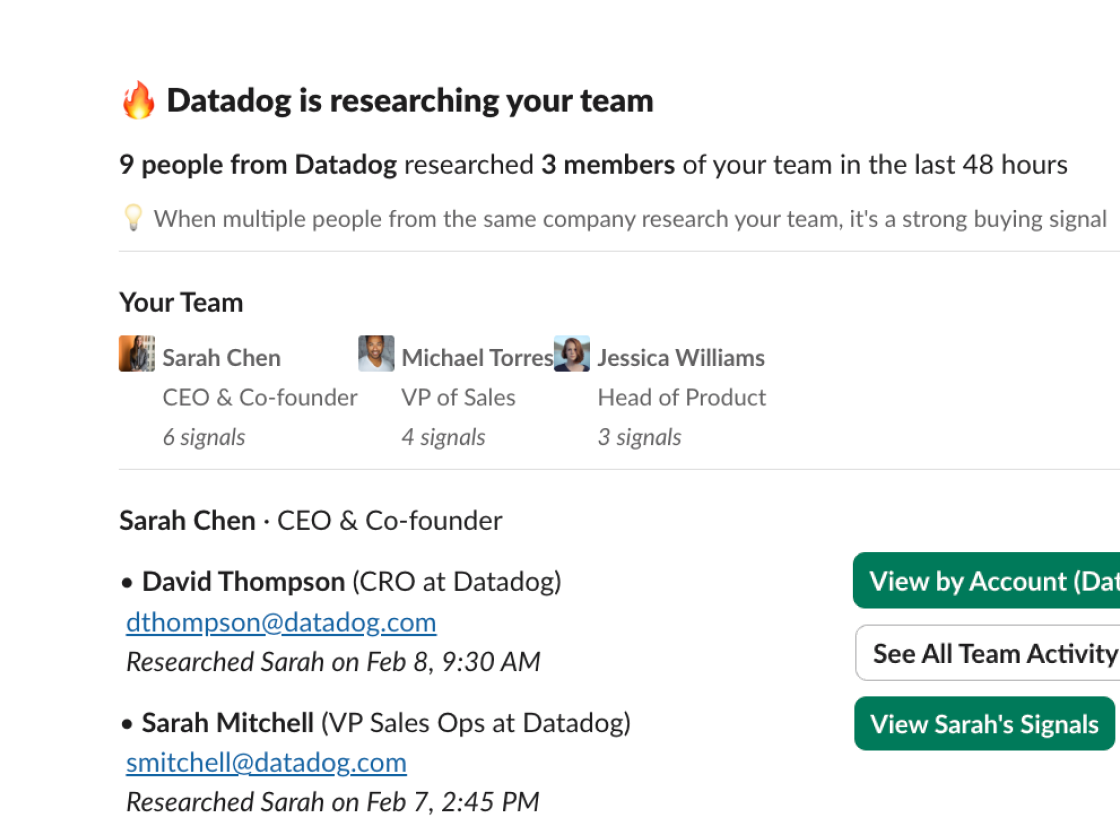
See the exact person who's researching your team—name, title, LinkedIn profile—delivered the moment they look at your team.
Stop Guessing Who to Call
The contact you need is right there. No more spending two hours on LinkedIn trying to find the right person at each account.
See What They Researched
Know which team members they looked at—your CEO, VP of Sales, product team. Use that context to personalize your outreach.
Tap Into Your Whole Team's Presence
You're not limited to people who viewed your profile. Harvest signals from your CEO, leadership team, product, engineering—everyone.
Respond While They're Warm
Reach out while they're still evaluating, not weeks later. The difference between a meeting and a ghost is timing.
Before and After
Your Day Without Mavin
- ✗Intent alert → 2 hours researching contacts
- ✗Guessing who's the right person to reach out to
- ✗Generic cold email to best guesses
- ✗No idea who actually researched your company
- ✗2% response rate on cold outreach
Your Day With Mavin
- ✓Buying signal: "Sarah Johnson (VP Sales) researched your CEO"
- ✓Full contact details ready—no research needed
- ✓Personalized outreach sent in minutes
- ✓See who checked out your leadership team and when
- ✓40%+ response rate on warm outreach
Team Intelligence
Harvest signals across your entire team.
As an individual SDR, you only see who viewed your own LinkedIn profile. Your CEO, VP of Sales, and product team all get researched by prospects constantly—and you never know about it. Mavin aggregates all those signals and routes them to you. You're not limited to your own reach—you leverage the entire company's LinkedIn presence.

“Our response rates are 5x higher when we contact prospects Mavin identifies as already researching us versus cold outreach. It's that simple.”
See Mavin in Action
Ramp New Sales Hires Faster
Your new AE starts in two weeks. Normally it takes 3–6 months before they have enough pipeline to hit quota. They're going to start with a cold list, zero context, and no LinkedIn presence of their own.
View playbook →Prioritize Your Target Accounts
You have 200 target accounts in your CRM. Your reps work them randomly—or alphabetically. Most aren't interested right now, and the ones that are look identical to the rest.
View playbook →Build Pipeline From Accounts That Want to Buy
Your pipeline is thin. Outbound is cold and getting colder. You need more pipeline—but adding more cold volume isn't the answer when response rates are at 2%.
View playbook →See which target accounts are researching your team today.
Setup takes 5 minutes. Start seeing buying signals immediately.