Getting the most out of Mavin
Mavin is a Slack-native app - no separate dashboard required. Learn how to set up your workspace, turn signals into pipeline, and maximize your buying intelligence.
Slack-Native Experience
No separate dashboard to log into. Buying signals flow directly to your Slack workspace daily, where your team already works.
Smart Filtering
See target account matches and persona matches highlighted. Quickly spot your highest-priority opportunities.
Turn Signals Into Pipeline
Learn how to respond while prospects are warm, personalize your outreach, and multi-thread into buying committees.
Maximize Your Buying Intelligence
This guide covers everything you need to know about using Mavin effectively - from setting up your dedicated Slack channel and adding your team, to using emoji reactions for coordination and converting signals into booked meetings. You'll learn personalization tactics, how to handle buying committee alerts, and best practices for tracking your performance.
Frequently Asked Questions
Mavin is a Slack-native app - that's where the product lives. There's no separate dashboard to log into. Everything happens in Slack: buying signals are delivered to your workspace daily, and you manage everything from there. Here's what to expect and how to maximize Mavin.
What to Expect
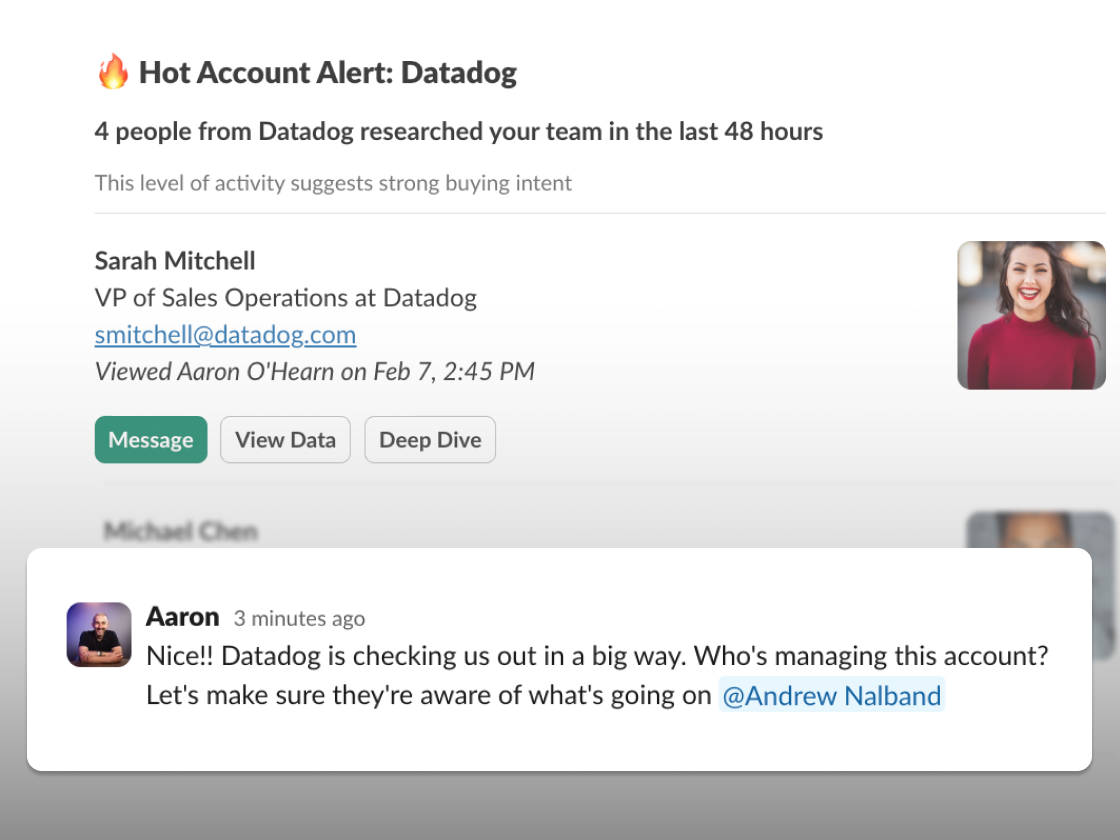
Mavin delivers buying signals directly to your Slack workspace once a day, showing you which specific people at which target accounts researched your team on LinkedIn. Here's how it works:
Daily Buying Signal Reports
You'll get notifications showing:
- Who: Specific person's name and title (e.g., "Sarah Johnson, VP of Sales")
- Email: Their professionally verified email
- Company: Which account they're from (e.g., "Acme Corp")
- Who they researched: Which team members they viewed
- Direct link: Click through to their LinkedIn profile, See Mutual Connections,
Example notification:
Smart Filtering
Mavin shows you everyone researching your connected team members, plus:
- Target account matches: If you've provided a target account list, we'll highlight which signals match
- Persona matches: If you've defined your ideal buyer personas, we'll identify which people match your criteria
This helps you quickly spot your highest-priority opportunities.
Pattern Recognition
When multiple people from the same account research your team, you'll see this called out in your notifications—a sign of buying committee activity.
This signals coordinated buying interest—your hottest opportunities.
Maximize Mavin
1. Set Up Your Mavin Channel
Create a dedicated channel for buying signals rather than using a general channel. This keeps signals visible and actionable.
Best practices:
- Name it clearly:
#mavin-buying-signalsor#linkedin-buying-signals - Pin important info: Response time expectations, routing rules
- Keep it focused: Only Mavin notifications in this channel
2. Add Your Whole Team
Invite everyone who should act on buying signals:
- SDRs/BDRs who do outreach
- Account Executives for their accounts
- Sales leadership to monitor activity
- RevOps to track signal quality
Why this matters: When Sarah from Acme researches your CEO, the AE who owns Acme should see that signal immediately—not days later.
3. Use Slack Reactions for Coordination
Create a system using emoji reactions:
- 👀 = "I'm looking at this"
- ✅ = "Reached out"
- 📅 = "Meeting booked"
- 🎉 = "Deal in progress"
This prevents duplicate outreach and shows team coordination.
Turn Signals Into Pipeline
Respond While They're Warm
Act on signals within 24-48 hours. When someone researches your team:
Within 24 hours: Send personalized outreach referencing what they viewed Within 48 hours: Follow up if no response After a few days: Signal goes cold—you've lost the momentum
Personalize Your Outreach
Use the signal context in your message:
❌ Generic: "Hey Sarah, wanted to reach out about our solution..."
✅ Personalized: "Hi Sarah—noticed you checked out our CEO's profile yesterday. Curious what caught your attention about our approach to enterprise sales?"
The fact that they researched your team is your conversation starter.
Multi-Thread on Buying Committees
When you see multiple people from one account:
- Identify the hierarchy: Who's the decision maker? Who are influencers?
- Coordinate your approach: Different messages to different stakeholders
- Reference the coordination: "Saw your team is evaluating solutions..."
- Move fast: They're clearly in buying mode
Track Your Performance
Monitor your Slack-to-pipeline metrics:
- Response time from signal to outreach
- Reply rates on signal-based outreach vs. cold
- Meeting booking rates
- Pipeline generated from signals
Share wins in Slack to keep the team motivated.
Common Questions
Will I get too many notifications?
At first you might—we're designed to surface all the buying signal data for you. That's intentional so you can see the full picture. You can always adjust what notifications you want in the Mavin app menu to focus on your highest-priority signals.
What if I miss a notification?
You can always see all historical signals and filter them in a way that makes sense for you. You can also export the data. Daily notifications keep you current, and the full history lets you go back and review patterns.
Can I turn off notifications temporarily?
Yes—mute the Slack channel or pause notifications in your Mavin settings. Signals will still be collected; you just won't get notified. Useful during vacations or when you're in deep focus work.
Do I see signals from all team members?
Yes—you see signals from all team members who have connected their LinkedIn accounts to Mavin. Encourage more team members to connect—especially executives and product team—to capture more buying intelligence.
How do buying committee alerts work? (Important!)
When 2+ people from the same account research your team within a short time window, Mavin recognizes this as coordinated interest and calls it out in your notifications. This is one of the most valuable signals—multiple stakeholders researching means serious buying intent. These are your hottest opportunities and should be prioritized.
Next Steps
Refine your routing rules: Make sure signals reach the right people on your team.
Set response time expectations: Get your team aligned on how fast to act on signals.
Track your conversion rates: Measure how buying signal outreach performs vs. cold outreach—you should see 5-10x better response rates.
Expand your team: Connect more team members to Mavin to harvest signals across your entire organization.
Leverage executive signals: When prospects research your CEO or leadership, these are often your best opportunities—make sure they're prioritized.
Why This Matters
Buying signals show you which specific people at which target accounts are interested. With daily Slack notifications, you stay current on who's researching your team and can respond while they're still warm—before they talk to competitors, before they lose interest, before the opportunity passes.
Because Mavin is Slack-native, you get buying intelligence where your team already works. No separate platform to check, no dashboard to log into. Just signals delivered to your workspace, ready to act on.
The difference between responding quickly vs. waiting a week is often the difference between booking a meeting and losing the deal.
New to Mavin? Check out our companion guide on what to expect in your first month for a timeline-based walkthrough of getting started.
Need help optimizing your Mavin workflow? Message us in the Slack app or email support@mavinhq.com.